Your pull requests, reviewed and answered by a crew of AI agents
Crewreview runs on your computer with the coding agents you already pay for. It reviews your teammates' pull requests and answers the reviews on yours: fixes, replies, resolves, asks for another look.
This loads the whole table into memory. Can we page it with a cursor?
Done: the list pages with a cursor now, 50 rows at a time, and the last page has a test.
🤖 Answered by Crewreview · fixed in 4e1d2c0Works with what you already use
- Claude Code
- Codex CLI
- Kiro CLI
- Gemini CLI
- OpenCode
- any ACP agent
- GitHub
- GitLab
- self-managed GitLab
Two jobs, one crew
The reviewer looks at your teammates' changes. The attendant takes care of the reviews on yours. Turn each on per repository: off, inbox (waits for your approval) or auto.
Reviewer
Several read-only lenses in parallel, a verifier that tries to prove them wrong, and a fixed rule for the verdict.
- Correctness, security, architecture, tests and UI lenses; add your own in the repository.
- Every finding points at a real file and line, or it's dropped.
- Reads the description, the discussion, CI and what changed since its last review; never repeats a point already made.
- Posts one review with inline comments, from your account.
1 blocker and 1 major issue. The verifier dropped one finding after reading the code.
The carrier API key ends up in the logs
logger.error(err.config) writes the request headers, Authorization included. Log err.config.url and the status instead.
Attendant
On your pull requests, it answers each comment: fixed, replied, declined, or left to you.
- Works in its own worktree, never in your clone.
- Runs your checks before pushing; commits with your identity and signature, never force-pushes.
- Replies, resolves fixed threads and asks reviewers to look again.
- The polish loop: review, fix, review again, before you ask a person.
This loads the whole table into memory. Can we page it with a cursor?
Done: the list pages with a cursor now, 50 rows at a time, and the last page has a test.
🤖 Answered by Crewreview · fixed in 4e1d2c0Watch the crew work
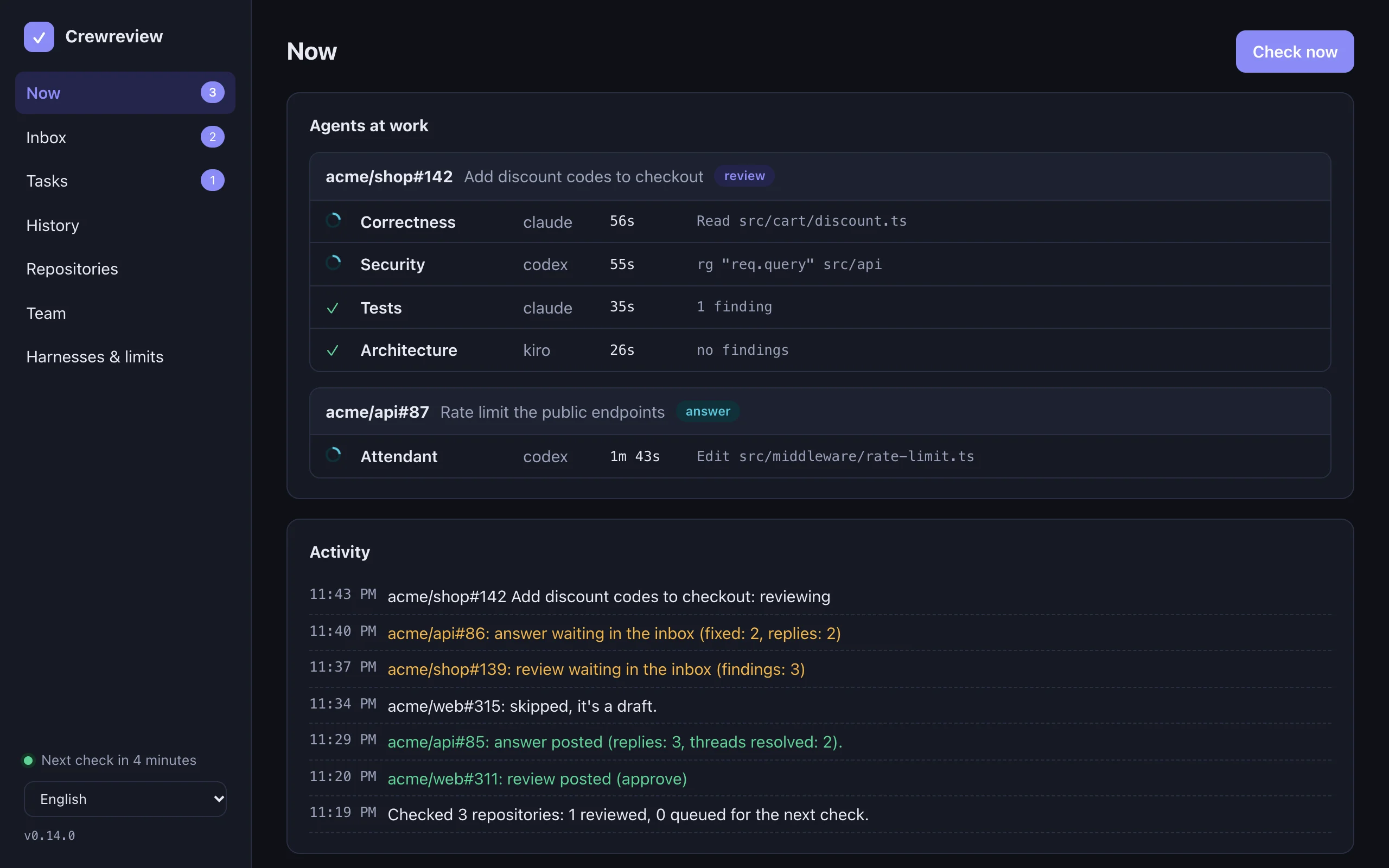
The dashboard runs on your computer, in the app's window or your browser. Five languages, light or dark.


How a review works
The model proposes; code decides. Each step can be checked in the report.
- ContextThe diff, the description, the discussion, CI and the project's own rules from the base branch.
- LensesRead-only agents look at the change in parallel, each through one lens.
- EvidenceFindings without a real file and line are dropped; duplicates are merged.
- VerifierAnother agent, even another vendor, tries to prove each finding wrong.
- VerdictA fixed rule decides: request changes, comment or approve.
Made for teams, without a server
Start on your own computer. When it earns the team's trust, everyone runs it the same way.
.crewreview/lenses/; the crew also follows AGENTS.md, CLAUDE.md and CONTRIBUTING.md. All read from the base branch, so a pull request can't change the rules it's judged by.Safe by design
Pull request text is written by others, and agents can be talked into things. Crewreview assumes both.
Bring the agent you already use
No API key needed: Crewreview drives the coding agents you're signed in to. A second vendor can check the first.
Or describe any CLI in your config. Flags that switch off a harness's safety are refused by a test on every command line Crewreview builds.
Get started
Takes a minute. Free, no account, everything runs on your computer.
Other systems: macOS · Apple silicon · macOS · Intel · Windows · Linux · x64 · Linux · arm64
On a phone? Crewreview runs on your computer. Pick its system:
- Download Crewreview.dmg with the button above.
- Open it and drag Crewreview into Applications.
- Open Crewreview. It lives in the menu bar: link a repository in its dashboard and the crew starts working.
- Download the installer with the button above.
- Run it. If Windows warns about an unknown publisher, choose More info, then Run anyway.
- Open Crewreview from the Start menu. It lives in the tray: link a repository in its dashboard and the crew starts working.
- Download the AppImage with the button above (or the .deb or .rpm from all downloads).
- Make it executable (
chmod +x) and open it. - Crewreview lives in the tray: link a repository in its dashboard and the crew starts working.
macOS 12+ · Apple silicon & Intel · Signed and notarized for macOS
Windows 10+ · x64 · Windows on Arm runs the x64 build.
x64 & arm64 · AppImage, .deb, .rpm
curl -fsSL https://crewreview.pururucos.com.br/install.sh | shirm https://crewreview.pururucos.com.br/install.ps1 | iexThen crewreview doctor checks your setup and crewreview ui opens the dashboard.
brew tap Quost/crewreview https://github.com/Quost/crewreview && brew trust quost/crewreview && brew install Quost/crewreview/crewreviewscoop bucket add crewreview https://github.com/Quost/crewreviewscoop install crewreview/crewreviewYour package manager keeps it up to date.
You'll need git, a coding agent (Claude Code, Codex or Kiro) and gh or glab signed in.
Using an AI assistant? Copy a ready-made prompt and paste it into Claude Code, Codex or any agent: it installs Crewreview, checks your setup and links your repositories.
All downloads · Every release's SHA256SUMS is signed with the release key.
Questions
What does it cost?
Crewreview is free. It uses the coding agents you already have, so their plans and limits apply; the dashboard shows tokens and cost where the harness reports them.
Does my code go anywhere?
Only to the harness you choose, which is where it already goes when you code with it. Crewreview has no server and no telemetry.
Which coding agents does it work with?
Claude Code and Codex CLI review and answer; Kiro CLI reviews. Any agent that speaks the Agent Client Protocol (Gemini CLI, OpenCode, Pi and others) works once crewreview doctor --conformance proves it can't write when it shouldn't. You can also describe any other CLI in your config.
Which git hosts?
GitHub and GitLab, cloud and self-managed. Bitbucket, Azure DevOps and Gitea are next.
Will it post things I didn't approve?
Not unless you switch a repository to auto. New repositories start in inbox mode, and sensitive changes always wait for you.
Will it push to my branch?
Only the attendant, only on your own pull requests, and only after the checks you set pass. It commits with your identity, never force-pushes, and changes to CI, secrets or deployment always wait for your approval.
How is it different from hosted AI review bots?
It runs on your computer with the agents you already pay for: no per-seat price, and your code goes only to the agent you already use. It also answers the reviews on your own pull requests, a fixed rule (not a model) decides the verdict, and every prompt is open source.
Can my whole team use it?
Yes. Each person installs it and links the team's repositories, or the whole organization or group at once; reviews post from their own account, and a commit someone's crew already reviewed is skipped. Shared lenses go in .crewreview/lenses/ in the repository.
I work alone. Can it approve my own pull requests?
Yes, with a second account. Nobody can approve their own pull request, so the crew posts its reviews as another account whose approvals count. The app walks you through it (Repositories → Post reviews as → Set it up step by step). On GitLab a group or project access token creates a bot account by itself: you paste the token and you're done. On GitHub you create the account, the app invites it with write access, and you paste a token of it. Tokens go to the system keychain, never to a file.
Why AGPL?
So it stays open: anyone who ships a modified version, or runs one as a service for others, must share the source.
Keep the crew working
Crewreview is free and open source, made by one developer. If it saves your team review time, sponsoring it pays for new hosts, harnesses and features.